

What Is a Thread Border Router? Thread, Matter and Ethernet Explained Simply
Matter, Thread, WiFi and Ethernet are increasingly common in modern smart home and IoT systems. This quickly raises the question: how can a wireless Thread device communicate with an existing Ethernet or WiFi network?
This is exactly where the Thread Border Router comes in. In this guide, we explain what role it plays, how Thread and Matter are related, and when an Ethernet connection can make sense.
What Is Thread?
Thread is a wireless networking protocol developed specifically for connected devices in smart homes and IoT. It is based on IEEE 802.15.4 and allows devices such as sensors, switches or actuators to communicate with each other in an energy-efficient way.
https://threadgroup.org/What-is-Thread/Overview
One key difference from conventional WiFi networks is the mesh structure: Thread devices can relay data via other devices in the network. This can increase range, and the network remains functional even if individual connections fail.
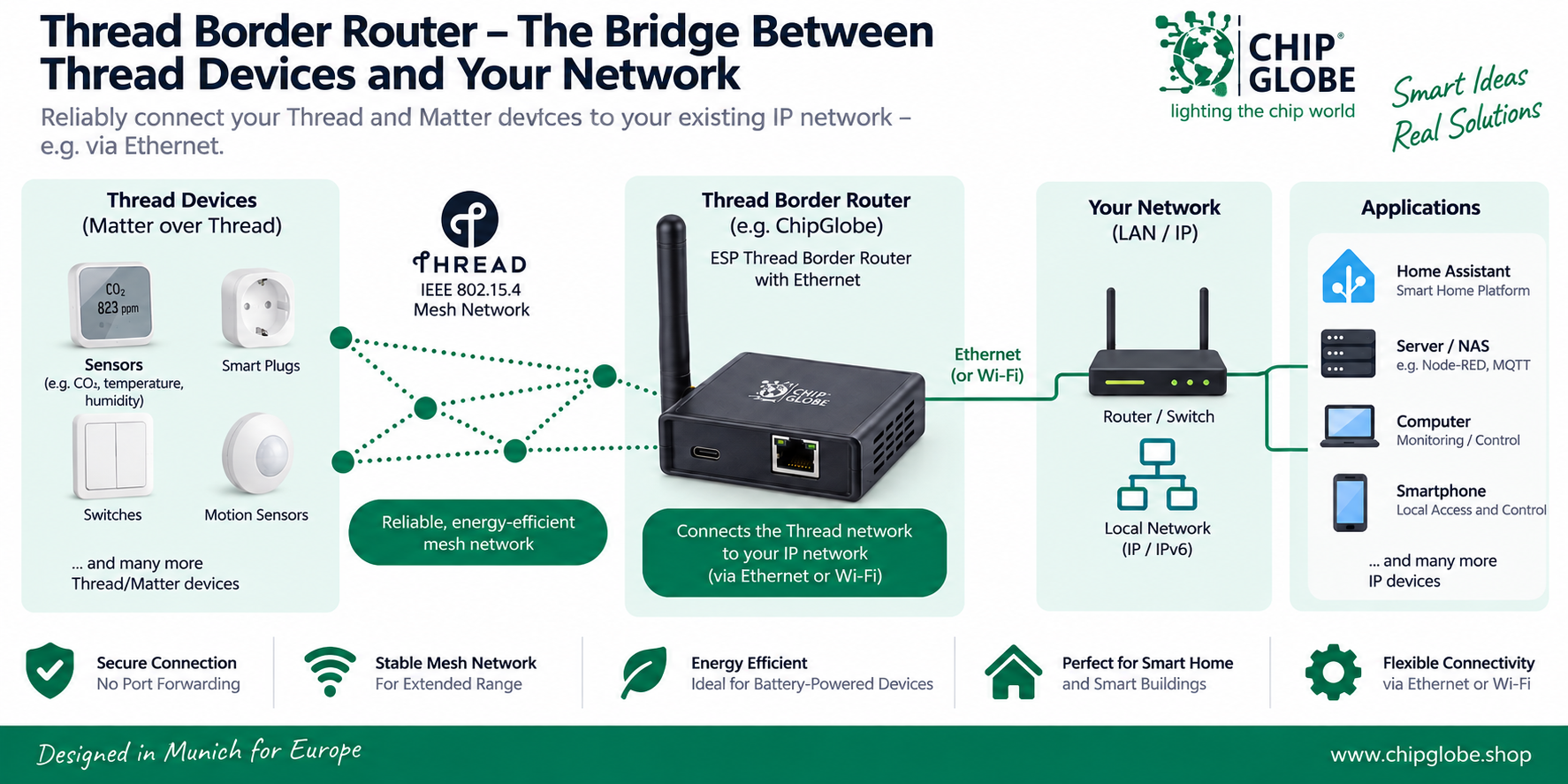
Thread uses IPv6. This makes devices part of an IP-based network. However, an interface is needed to connect the Thread wireless network with an existing LAN or WiFi network – the Thread Border Router.
What Is a Thread Border Router?
A Thread Border Router connects a Thread network to other IP networks, such as a local Ethernet or WiFi network. It thus forms the bridge between the wireless Thread devices and the existing network infrastructure.
The Border Router is not simply a conventional WiFi router. Its role is to forward IP traffic between the Thread network and adjacent IP networks. This allows applications and services outside the Thread network to communicate with the corresponding devices.
What Role Does a Thread Border Router Play?
- Connects the Thread mesh network to the existing IP network
- Forwards IPv6 traffic between the networks
- Makes suitable Thread devices reachable from the local network
- Integration of Thread into Existing Smart Home and IoT Infrastructures
- Connection to the existing network via Ethernet or Wi-Fi, depending on the specific border router solution
How are “matter” and “thread” related?
Matter and Thread are often mentioned together, but they are not the same thing. Thread provides the network connection between devices, while Matter is a cross-manufacturer standard that defines how compatible smart home devices communicate with and are controlled by one another.
Matter can use various IP-based network technologies. For example, devices can be integrated into a Matter system via Thread, Wi-Fi, or Ethernet. Therefore, a Matter device does not automatically require Thread.
Thread is often used for battery-powered or particularly energy-efficient devices such as sensors, door contacts or switches. For these Matter-over-Thread devices to communicate with the rest of the IP network, a Thread Border Router is required.
Thread = wireless, IP-based network for IoT and smart home devices
Matter= cross-manufacturer standard for compatible smart home devices
Thread Border Router= connection between the Thread network and the rest of the IP network
Why is Ethernet useful with a Thread border router?
A thread border router requires a connection to the existing IP network. Depending on the device, this connection can be established via Wi-Fi or Ethernet, for example. A wired Ethernet connection is particularly well-suited for permanently installed border routers.
Ethernet provides a stable network connection that is independent of Wi-Fi reception. This can be particularly advantageous if the border router is operated continuously at a fixed location or is to be integrated into an existing network infrastructure with switches, servers, or smart-home systems.
Advantages of an Ethernet Connection
- Reliable wired connection to the local network
- Regardless of Wi-Fi coverage at the installation site
- Easy integration into existing LAN infrastructures
- Well-suited for permanently installed smart home and IoT systems
- Can be connected directly to a router or network switch
Practical Example: Thread Border Router with Ethernet
A practical example of this architecture is a Thread border router with an Ethernet port. On the Thread side, the device communicates wirelessly with the Thread mesh network. At the same time, the border router connects to the existing local IP network via the Ethernet port.
This creates a secure connection between the wireless Thread network and the existing LAN infrastructure. Applications and services on the local network can thus communicate with compatible devices on the Thread network.
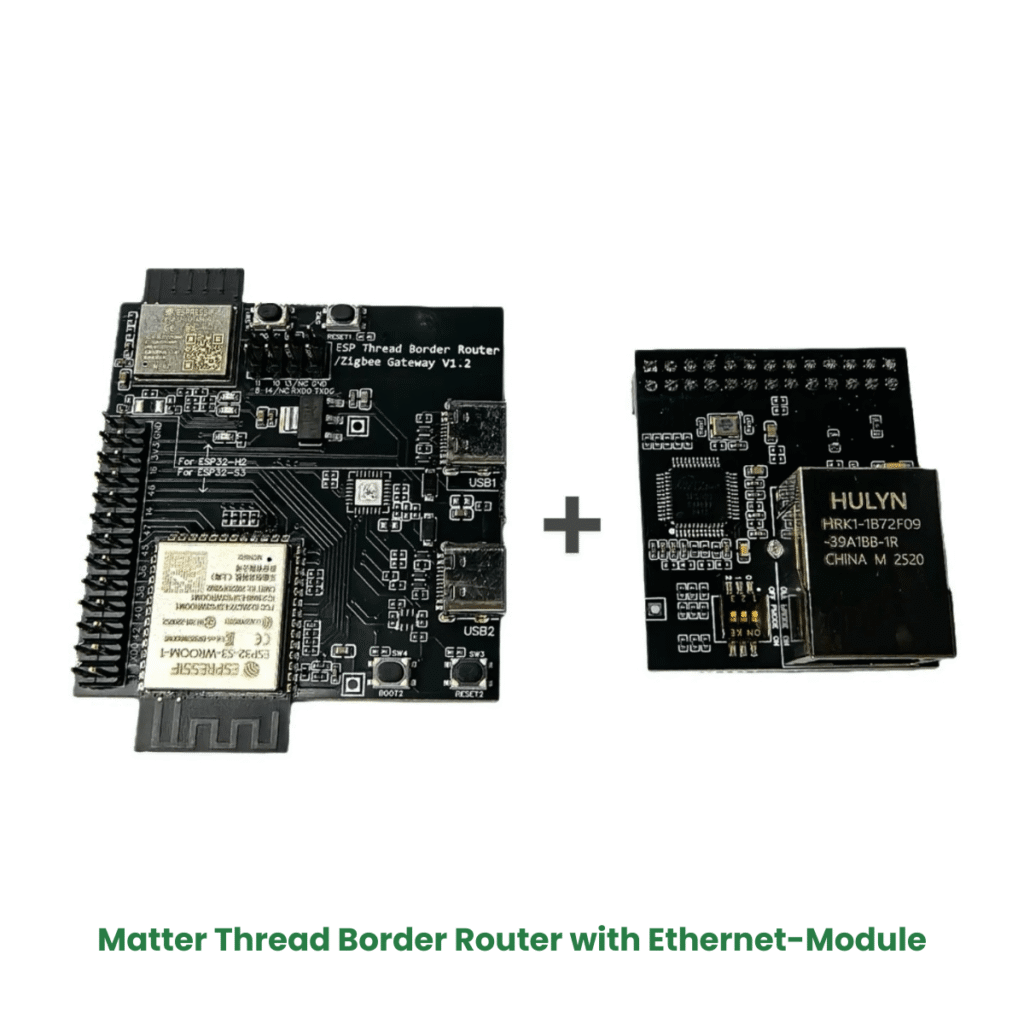
Der ChipGlobe ESP Thread Border Router
The ESP Thread Border Router from ChipGlobe is a compact solution for setting up an Ethernet-connected Thread infrastructure. It connects a Thread network to the existing IP network, making it ideal for development, smart home, and IoT projects, for example.
When do I need a thread border router?
A Thread Border Router is required when Thread devices need to be connected to the rest of the IP network. This is particularly relevant for Matter devices, which use Thread as their networking technology.
However, not every Matter system requires a Thread Border Router. Matter devices can also communicate via Wi-Fi or Ethernet. The key factor, therefore, is which network technology the device in question uses.
Typical Applications
- Matter-over-Thread Devices in the Smart Home
- Sensors, switches, and other energy-efficient Thread devices
- Home Automation and IoT Systems with Thread Support
- Development and Testing Environments for Matter and Thread
- Permanently installed Thread networks connected to an existing LAN infrastructure
Frequently Asked Questions About Thread Border Routers
Conclusion: Thread as the Foundation for Modern IoT Networks
Thread enables the creation of energy-efficient, IP-based mesh networks for smart home and IoT devices. A Thread Border Router establishes the connection between the wireless Thread network and the existing IP infrastructure.
Whether a Wi-Fi or Ethernet connection is more appropriate depends on the specific application. For permanently installed systems, Ethernet can provide a stable connection that is not dependent on Wi-Fi reception. Ultimately, the deciding factor is which devices, applications, and network infrastructure are used in the specific project.


